
 Admin
Admin MLT Club
AdminForum Replies Created
-

Hi Daniel,
It’s located on the top right corner of the website (even above the MLT logo) in grey letters (not underlined).
If you’re logged in it will say Logout | “Your User Name”
If you’re logged out it will say LoginHope that helps!
-
MLT Club
Administrator16/01/2020 at 19:33 in reply to: Which is better, the Rolling Stones or the Beatles, and why?Hey guys,
Since this thread has now over 150 posts we closed this topic for clarity and accessibility. Please feel free to open new threads for new topics.
Thank you! -
MLT Club
Administrator23/11/2019 at 12:16 in reply to: Whoops Oops… Wrong title with corresponding postOops, fixed it! We created an extra post there by accident with a wrong headline, but it’s all sorted now!
Hugs,
Team MLT
-
Thanks for noticing and letting us know, we just updated the video. We are always thankful for reports like that!
Have a good day!
-
Unfortunately, we had to remove the pictures, as we might run into copyright issues when artworks from other artists are used as a basis for own creations. We already had that problem before when a Club member used the comic character Johnny Bravo and other works without consent of the copyright owners.
You can certainly post appropriate original creations but in order to avoid legal trouble for anyone, please stay clear of using artwork where other parties’ copyrights are involved.
-
Hi Jacki,
Do you mean the plus symbols shown here?
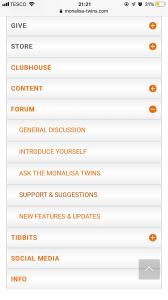
When you click them (like I did for the “forum” button in the picture) it opens up the corresponding submenu. The same menu you’d see when hovering over the different buttons with your mouse when on your computer. The plus turns into a minus and you can close the submenu again by clicking the minus.
Does that make sense and is that what you meant?
It is simply a way of structuring the menu on phones and tablets so it doesn’t take up too much space.
Sorry for the late reply but please let us know if that answers your question 🙂
-
Hi David,
Thanks for letting us know. We were able to fix that right away and sincerely apologize for any inconveniences caused! -
Thanks for making us aware of this, David! We fixed it and everything should play again smoothly 🙂
Happy listening! -
We have to be sorry for any inconvenience with profile photos because we had some technical troubles with profile images not showing up. We’d actually prefer one that shows your face 🙂 You can upload it on the “My Account” page that you can access in the top menu.