
 Admin
Admin Rudolf Wagner
AdminForum Replies Created
-

Yes, we had a major update of our database where some strange things happened. Luckily they were just a temporary glitch.
-
Rudolf Wagner
Administrator09/03/2020 at 16:54 in reply to: Alignment buttons in post editor produce code snippetsI tried to edit the post again and this time it worked.
You did not enter some html code in the post directly, right? -
This appears on topics where you have replied at least once.
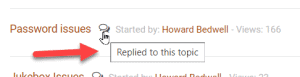
If you hover with your mouse over the bubble you can see the explanation box.
-
Rudolf Wagner
Administrator08/03/2020 at 17:18 in reply to: Alignment buttons in post editor produce code snippetsHello Howard,
It seems like something went wrong with your post. It contained some strange code and when I tried to edit it it disappeared completely. Would you please try to post it again?
We did a major database update and had a few hiccups. We could fix most of them already but there might still be some irregularities that went unnoticed. Please continue to inform us about it. It really helps a lot 🙂
-
We are already working at it 🙂
-
You guys got me thinking about the usability of the user profile or “my account” page and I must admit it is not the most logical layout I have ever seen. There are 3 places where you can change password and also the names of the tabs are not very clear.
Unfortunately this is a default setting and the tab symbols and the content of the tabs is not so easy to change. For the moment I renamed the shop tab to “my account” because “shop/membership” would be too long. Hope that helps until we find a better solution.
-
I am not sure if I understand the problem so please tell me if I am right.
Is it that now there is the small round profile picture with the profile owner’s name beside it instead of just the “my account” link in the uppermost menu on the right side? It is exactly the same function as before it just looks different.
I must admit that we did that on purpose because we thought that might look nicer than just the “my account” link. It’s one of two options of the WordPress theme we use and of course a bad idea if it confuses people.
I changed the owners name against the “My Account” link for now (similar to what Jung Roe suggested above).
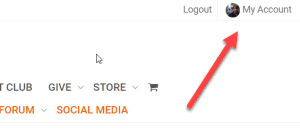
The name and account might be too long for some mobile phones. Please have a look and tell me if that makes more sense to you.Please also tell me if the problem is a totally different one maybe within the menu structure of the “My Account” page? On the screenshot above I see that you watch the Shop > Account Details page which always was the most boring tab because there never was much to see here. All of the important information regarding subscriptions and memberships and payment methods you can find within the other tabs like “Membership Subscription“, “Orders” or “Payment Methods”
Any idea how to make navigation easier is really welcome even if it would be hard to realize at the moment.
-
Yes, is there still a problem now or does it all work?
-
That looks like you are not logged in (in comparison to being logged in but not being able to access the Club). What happens if you click the login link in the upper right corner?
-
Good gracious, that was a nasty bug. And once again it was the cache. Not the browser cache but the server side cache. Glad it works now. 🙂
-
Rudolf Wagner
Administrator11/03/2020 at 16:31 in reply to: Alignment buttons in post editor produce code snippetsI tried to replicate that error but with no luck.
It was also very easy to fix your post by just copying the text you posted, getting rid of the html code, re-pasting and centering it with the align center button.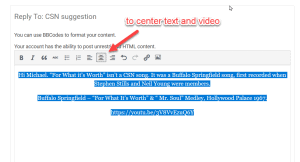
It looks like html code was sneaking in somehow.
Can you describe how exactly you made these posts?
Do you write them in another program and then copy and paste it here?
My suspicion is that it is not clean text you are posting but text with some html formatting attached.
To really make sure posting clean text only you can copy it first into a text editor like Windows notepad before pasting it into the forum.Or do you use BB Codes?
This is actually not necessary because you can do it all with the graphical user interface above and I must admit I never tried to use the codes directly. I know that it says above “You can use BBCodes to format your content.” but it is meant through the buttons below. -
I am very much almost sure I heard that Sir Paul got his Most Noble Order of the Garter (a.k.a. MBO) because of only using flatwound strings on his Höfner. The Queen I’m almost pretty sure would not tolerate anything else anyway.
-
Thanks for sending me the picture. I have no other chance to see the error because I can not produce it myself. I can see that this has nothing to do with your membership password. Therefore trying to put that in would not help. The screen is normally used to protect single pages on a wordpress site with a password. As I never used that function I must admit that I have no idea why it appears at the moment.
I even tried to log into our site via VPN from different places around the world like Canada, Australia, USA, China but was not yet able to reproduce that error. As a lost resort I tried to delete all the server side cache on our server and on Cloudflare. Maybe that helps. Sorry for the bother and I appreciate very much that you keep me updated about that issue.
-
This is really strange. I now tested it on different Desktops Win 7 and 10, Ipad Air 2, Iphone SE and 6S+ and a few Android devices and it was working on all of them no matter what browser I used. I wonder what could be different on your side than the content of the cache.
The description of emptying the cache on the MacAir is correct as far as I can see.
Emptying the browser cache on IOS (Ipad, Iphone):
https://help.fox.com/s/article/How-can-I-clear-cache-on-my-iOS-deviceIs it still not working?
Do you see the orange line “Advanced Search” like in the image above?
If yes, what happens when you click on it?